
Mosaic Integration of RNA+ADT+ATAC#
In this tutorial, we demonstrate how to use MIDAS to integrate a mosaic dataset consisting of paired and unpaired RNA (gene expression), ADT (antibody-derived tags), and ATAC (assay for transposase-accessible chromatin) data.
1. Setting Up the Environment#
We import the necessary libraries and set up the environment. The first code cell exposes a small GPU configuration block — GPUS and STRATEGY — that controls which device(s) the demo uses. The defaults run on a single GPU; switching to multi-GPU only requires changing those two values (see the comments inside that cell).
[1]:
import warnings
warnings.filterwarnings('ignore')
import logging
logging.basicConfig(level=logging.INFO)
import os

# === GPU configuration ===
# Single-GPU (default; works inside this notebook):
GPUS = '0'
STRATEGY = 'auto'

# Multi-GPU options (uncomment one):
# - In a notebook (slower DDP startup, no script conversion needed):
#       GPUS = '0,1'; STRATEGY = 'ddp_notebook'
# - As a script (recommended for production multi-GPU):
#       GPUS = '0,1'; STRATEGY = 'ddp'
#       Run with: jupyter nbconvert --to script <this notebook>.ipynb && python <this notebook>.py

if GPUS is not None:
    os.environ['CUDA_VISIBLE_DEVICES'] = GPUS

# Lightning's `devices='auto'` defaults to 1 in notebooks even when more GPUs
# are visible, so we derive an explicit device count from `GPUS`.
DEVICES = len(GPUS.split(',')) if GPUS else 'auto'
# === /GPU configuration ===

import subprocess
from pathlib import Path

import lightning as L
import numpy as np
import pandas as pd
import scanpy as sc

import scmidas
from scmidas.config import load_config
from scmidas.data import download_data, download_models, download_script

sc.set_figure_params(figsize=(4, 4))    # Set plotting parameters for scanpy
L.seed_everything(42)                   # Set a global random seed for reproducibility
INFO: Seed set to 42
INFO:lightning.fabric.utilities.seed:Seed set to 42
[1]:
42
2. Downloading the Data#
We will use a multi-batch (4 batches) RNA+ADT+ATAC mosaic dataset in mtx format.
[2]:
task = 'teadog_mosaic_mtx'
download_data(task)

# Load directory-format dataset as a MuData (one AnnData per modality).
mdata = scmidas.datasets.from_dir(
    f'dataset/{task}/data',
    label_dir=f'dataset/{task}/label',
)
mdata
INFO:scmidas.data:Downloading from https://pub-cfde59ed245349228f47377c9ae32dd3.r2.dev/teadog_mosaic_mtx.zip.
Downloading teadog_mosaic_mtx.zip: 100%|██████████| 306M/306M [00:18<00:00, 16.2MB/s]
INFO:scmidas.data:Downloaded: https://pub-cfde59ed245349228f47377c9ae32dd3.r2.dev/teadog_mosaic_mtx.zip to dataset/teadog_mosaic_mtx.zip
INFO:scmidas.data:Unzipped: dataset/teadog_mosaic_mtx.zip to dataset
INFO:scmidas.datasets:from_dir: loaded 3 modalities (['rna', 'adt', 'atac']) across 4 batches.
[2]:
MuData object with n_obs × n_vars = 31350 × 32240
  obs:      'batch', 'label'
  uns:      'feat_dims'
  3 modalities
    rna:    24213 × 4045
      obs:  'batch', 'label'
      uns:  'mask_dig_stim', 'mask_lll_ctrl', 'mask_w1'
    adt:    24025 × 224
      obs:  'batch', 'label'
      uns:  'mask_dig_stim', 'mask_lll_ctrl', 'mask_w6'
    atac:   23989 × 27971
      obs:  'batch', 'label'
3. Configuring the Model#
[3]:
configs = load_config()
configs['num_workers'] = 8  # Adjust based on your system's CPU cores for data loading

# `dims_x` carries the ATAC chromosome chunk sizes that `from_dir` read
# from feat_dims.toml. ATAC counts are binarized by default.
scmidas.MIDAS.setup_mudata(mdata, batch_key='batch', dims_x=mdata.uns['feat_dims'])
model = scmidas.MIDAS(
    mdata,
    configs=configs,
    save_model_path=f'saved_models/{task}',
)
INFO:scmidas.config:The model is initialized with the default configurations.
INFO:scmidas.model:setup_mudata: batch_key='batch', batches=['dig_stim', 'lll_ctrl', 'w1', 'w6'], modalities=['rna', 'adt', 'atac'], dims_x={'rna': [4045], 'adt': [224], 'atac': [2897, 2007, 1531, 851, 1201, 1644, 1318, 1028, 1137, 1251, 1520, 1477, 511, 1024, 927, 1284, 1920, 413, 2106, 836, 324, 764]}
INFO:scmidas.model:Input data:
          #CELL    #RNA   #ADT    #ATAC  #VALID_RNA  #VALID_ADT
dig_stim   9527  4045.0  224.0  27971.0      3738.0       208.0
lll_ctrl   7361  4045.0  224.0      NaN      3845.0       208.0
w1         7325  4045.0    NaN  27971.0      3674.0         NaN
w6         7137     NaN  224.0  27971.0         NaN        45.0
4. Training the Model#
[4]:
use_pretrained = True # To train from scratch, set it to False

if use_pretrained:
    download_models(task)
    model.load_checkpoint(f'saved_models/{task}.pt')
else:
    model.train(
        max_epochs=2000,
        accelerator='gpu',
        devices=DEVICES,
        strategy=STRATEGY,
    )
INFO:scmidas.data:Downloading from https://pub-cfde59ed245349228f47377c9ae32dd3.r2.dev/teadog_mosaic_mtx.pt.
Downloading teadog_mosaic_mtx.pt: 100%|██████████| 216M/216M [00:12<00:00, 17.2MB/s]
INFO:scmidas.data:Downloaded: https://pub-cfde59ed245349228f47377c9ae32dd3.r2.dev/teadog_mosaic_mtx.pt to saved_models/teadog_mosaic_mtx.pt
5. Generating Predictions#
With a trained model, MIDAS exposes two prediction surfaces:
High-level (recommended):
model.get_latent_representation(kind='c'|'u'|'joint')andmodel.get_imputed_values(modality=...)return aligned arrays writable straight intomdata.obsm.Low-level (advanced):
model.predict(...)exposes every flag (per-modality latents, modality translation, batch-corrected reconstructions). Used below for visualizations that need the per-modality and batch-corrected outputs.
[5]:
# High-level API — write joint latents to mdata.obsm
mdata.obsm['X_midas']   = model.get_latent_representation(kind='c')          # biological c (32-dim)
mdata.obsm['X_midas_u'] = model.get_latent_representation(kind='u')          # technical u (2-dim)
print('mdata.obsm[X_midas].shape   =', mdata.obsm['X_midas'].shape)
print('mdata.obsm[X_midas_u].shape =', mdata.obsm['X_midas_u'].shape)
mdata.obsm[X_midas].shape   = (31350, 32)
mdata.obsm[X_midas_u].shape = (31350, 2)
[6]:
outputs = model.predict(
        joint_latent=True,
        input=True,
        batch_correct=True,
        impute=True,
        translate=True,
        mod_latent=True,
        )
INFO:scmidas.model:Predicting using device: cuda
INFO:scmidas.model:Processing batch dig_stim: ['rna', 'adt', 'atac']
predict:dig_stim: 100%|██████████| 38/38 [00:07<00:00,  5.26it/s]
INFO:scmidas.model:Processing batch lll_ctrl: ['rna', 'adt']
predict:lll_ctrl: 100%|██████████| 29/29 [00:04<00:00,  6.14it/s]
INFO:scmidas.model:Processing batch w1: ['rna', 'atac']
predict:w1: 100%|██████████| 29/29 [00:05<00:00,  5.47it/s]
INFO:scmidas.model:Processing batch w6: ['adt', 'atac']
predict:w6: 100%|██████████| 28/28 [00:05<00:00,  5.40it/s]
INFO:scmidas.model:Batch correction (second pass) ...
INFO:scmidas.model:Processing batch dig_stim: ['rna', 'adt', 'atac']
batch_correct:dig_stim: 100%|██████████| 38/38 [00:04<00:00,  8.30it/s]
INFO:scmidas.model:Processing batch lll_ctrl: ['rna', 'adt']
batch_correct:lll_ctrl: 100%|██████████| 29/29 [00:03<00:00,  8.72it/s]
INFO:scmidas.model:Processing batch w1: ['rna', 'atac']
batch_correct:w1: 100%|██████████| 29/29 [00:03<00:00,  8.23it/s]
INFO:scmidas.model:Processing batch w6: ['adt', 'atac']
batch_correct:w6: 100%|██████████| 28/28 [00:03<00:00,  7.12it/s]
[7]:
from scipy.sparse import csr_matrix
ad_list = []
for k, v in outputs.items():
    ad = sc.AnnData(np.zeros([v['s']['joint'].shape[0], 1]))
    # z_c / z_u are 32-dim and 2-dim dense latents — keep as dense ndarray
    for var in ['z_c', 'z_u']:
        for m in v[var].keys():
            ad.obsm['%s_%s'%(var,m)] = v[var][m]
    # x_bc are reconstructed counts — RNA/ATAC are ~85% zero, csr saves memory
    for var in ['x_bc']:
        for m in v[var].keys():
            ad.obsm['%s_%s'%(var,m)] = csr_matrix(v[var][m])
    ad.obs['batch'] = k
    ad.obs['label'] = pd.read_csv('./dataset/'+task+'/label/%s.csv'%k, index_col=0).values.flatten()
    ad_list.append(ad)
[8]:
adata = sc.concat(ad_list)
adata
[8]:
AnnData object with n_obs × n_vars = 31350 × 1
    obs: 'batch', 'label'
    obsm: 'z_c_joint', 'z_u_joint', 'x_bc_rna', 'x_bc_adt', 'x_bc_atac'
6. Visualizing the Results#
First, we load the cell-type labels and batch identifiers for annotation.
6.1 Joint Embeddings#
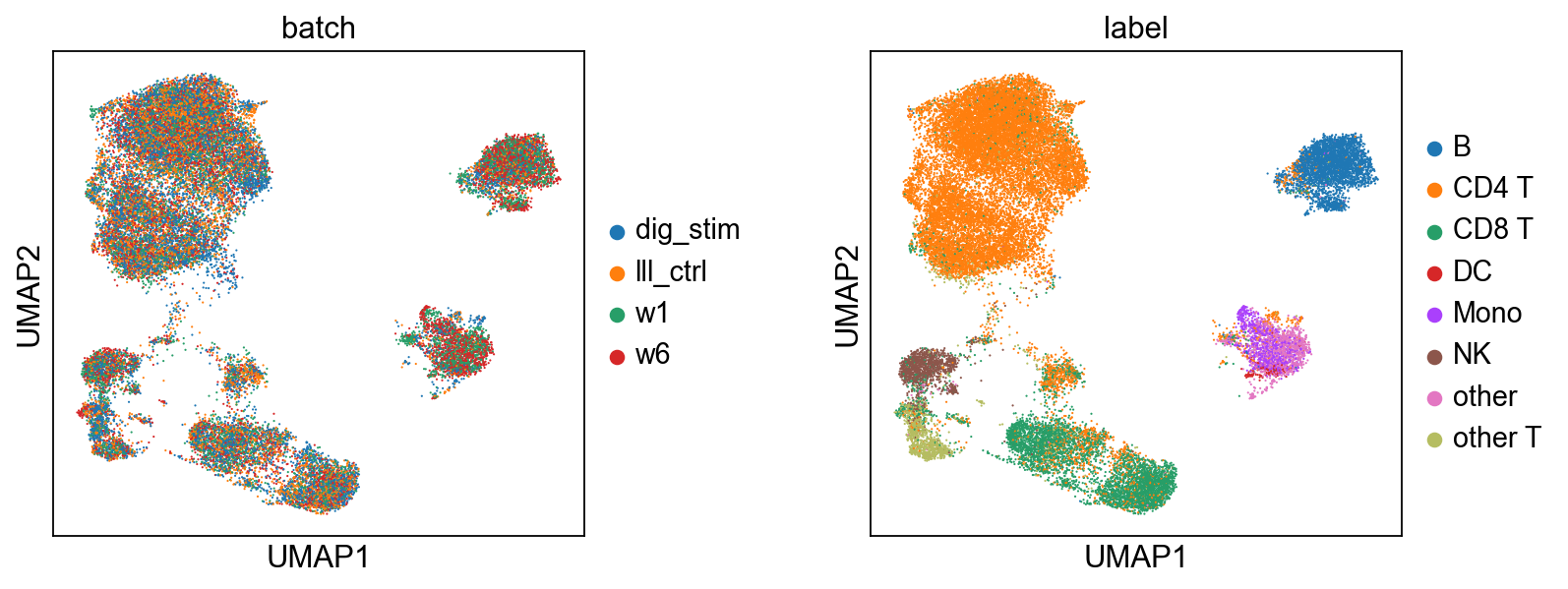
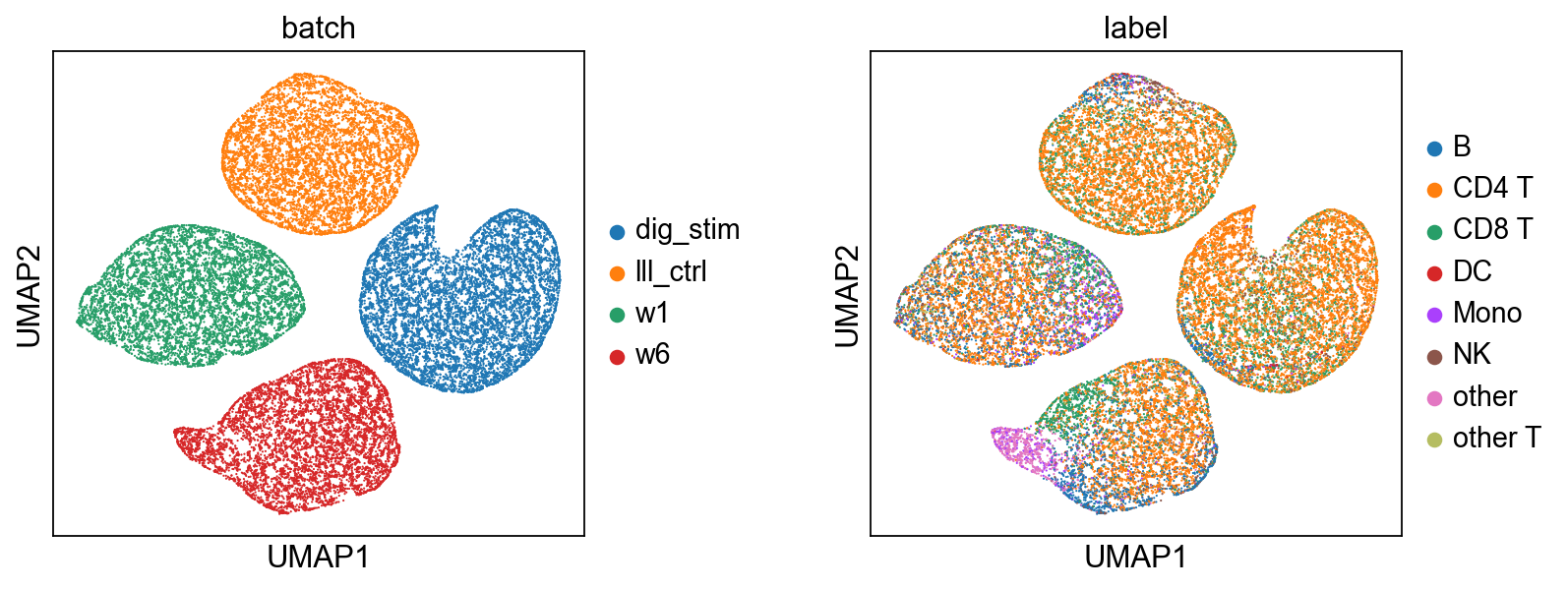
[9]:
# Biological State (z_c) — coloured by batch and cell type.
scmidas.pl.umap(
    mdata, basis='X_midas',
    color=['batch', 'label'], wspace=0.4,
)
# Technical Noise (z_u)
scmidas.pl.umap(
    mdata, basis='X_midas_u',
    color=['batch', 'label'], wspace=0.4,
)
[9]:
AnnData object with n_obs × n_vars = 31350 × 2
    obs: 'label', 'batch'
    uns: 'neighbors', 'umap', 'batch_colors', 'label_colors'
    obsm: 'X_umap'
    obsp: 'distances', 'connectivities'
6.2 Modality-Specific Embeddings#
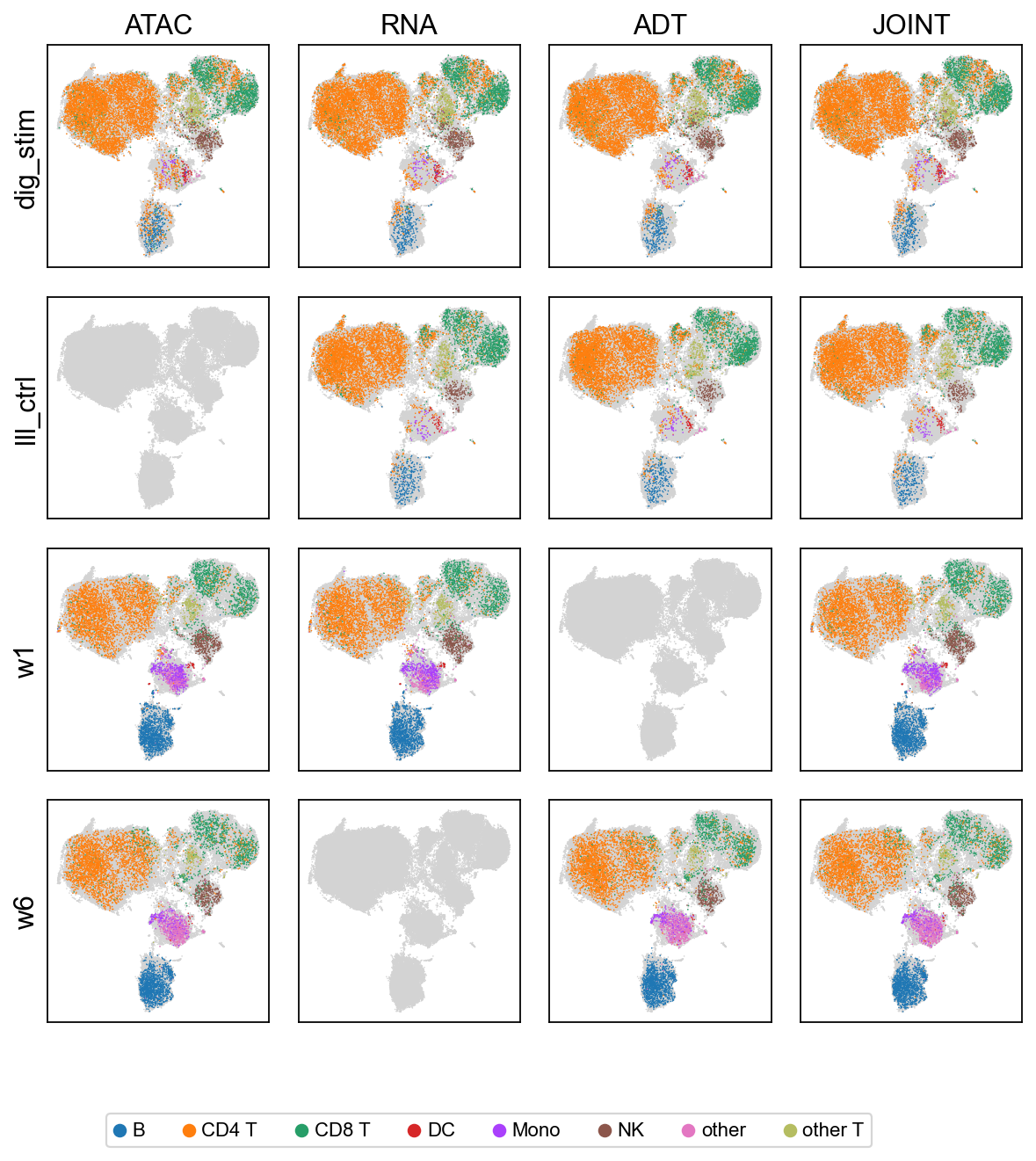
We visualize the biological embeddings (c) for each modality (RNA, ADT, ATAC) and for the joint representation, across all 4 batches.
[10]:
# Per-modality biological latent grid (modality × batch),
# coloured by cell type. Internally re-runs predict(mod_latent=True);
# the per-modality views answer 'does this single modality alone
# carry enough signal to separate cell types in this batch?'
scmidas.pl.modality_grid(model, mdata, label_key='label')
[10]:
AnnData object with n_obs × n_vars = 103577 × 32
    obs: 'type', 'batch', 'label'
    uns: 'neighbors', 'umap', 'label_colors'
    obsm: 'X_umap'
    obsp: 'distances', 'connectivities'
6.3 Imputed and Batch-Corrected Data#
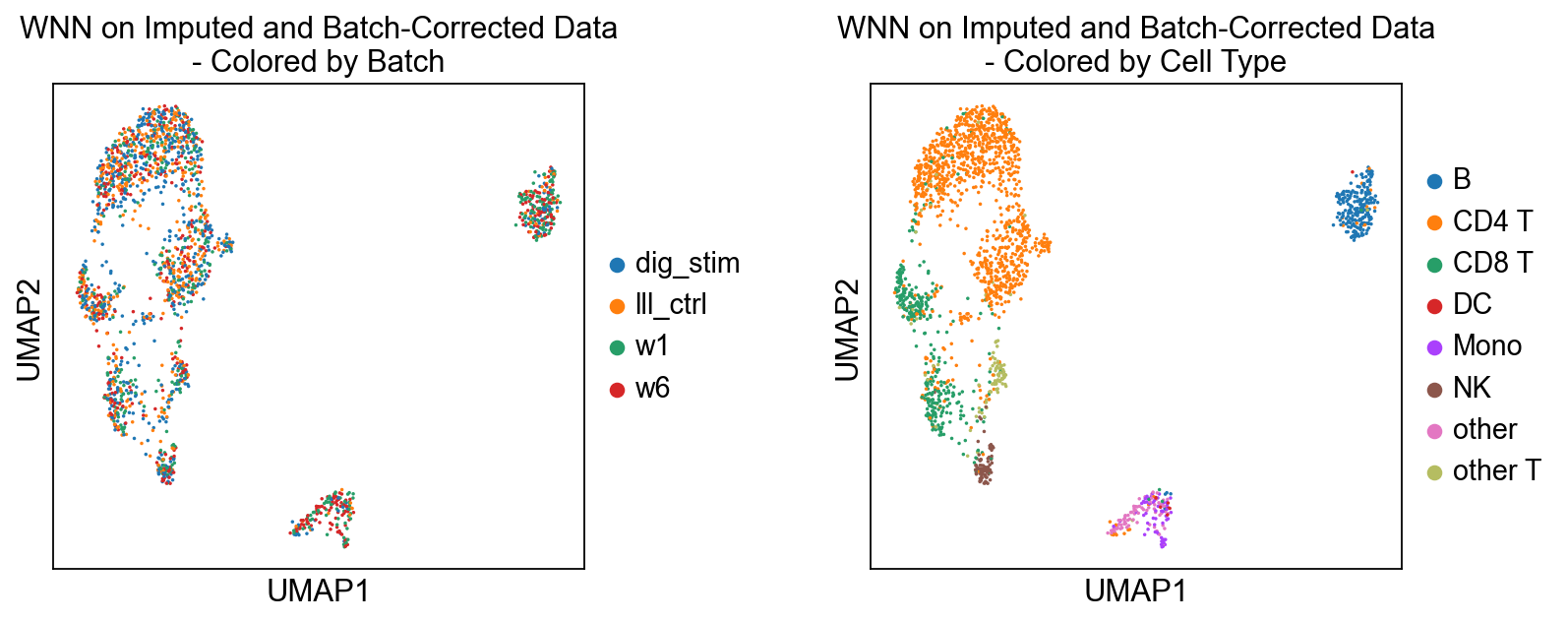
We use WNN to compute joint embeddings from the imputed and batch-corrected counts.
For efficiency, we’ll use a random sample of 2000 cells.
[11]:
N = 2000
select = np.random.choice(list(range(len(adata))), N, replace=False)
data = {
    'x_bc_rna' : adata.obsm['x_bc_rna'][select].toarray(),
    'x_bc_adt' : adata.obsm['x_bc_adt'][select].toarray(),
    'x_bc_atac' : adata.obsm['x_bc_atac'][select].toarray()
}
[12]:
temp_dirs = {"Imputed and Batch-Corrected Data": 'demo3_temp/x_bc/'}
r_script_file = 'wnn_trimodal.R' # R script for WNN analysis on RNA+ADT+ATAC data
download_script(r_script_file)

for name, temp_dir in temp_dirs.items():
    # 1. Save Python data to disk for the R script to access
    os.makedirs(temp_dir, exist_ok=True)
    data_key = Path(temp_dir).name  # 'x_bc' or 'x'
    pd.DataFrame(data[data_key+'_rna']).T.to_csv(temp_dir+'rna.csv', index=True)
    pd.DataFrame(data[data_key+'_adt']).T.to_csv(temp_dir+'adt.csv', index=True)
    pd.DataFrame(data[data_key+'_atac']).T.to_csv(temp_dir+'atac.csv', index=True)

    # 2. Execute the R script via a subprocess
    print(f"\nPython: Executing R script '{r_script_file}' for {name}...\n")
    command = ['Rscript', '--vanilla', r_script_file, temp_dir]
    result = subprocess.run(command, check=True, capture_output=True, text=True)
    # print(result.stdout) # uncomment this line to see the R script's output

    # 3. Load the UMAP results generated by R and plot them
    ad = adata[select]
    ad.obsm['X_umap'] = pd.read_csv(temp_dir+'umap_coords.csv', index_col=0).values
    sc.pp.subsample(ad, fraction=1) # Shuffle data
    sc.pl.umap(ad, color=['batch', 'label'], ncols=2, wspace=0.4, size=10,
                            title=[f'WNN on {name}\n- Colored by Batch', f'WNN on {name}\n- Colored by Cell Type'])
'wnn_trimodal.R' already exists. Skipping download.

Python: Executing R script 'wnn_trimodal.R' for Imputed and Batch-Corrected Data...
... storing 'batch' as categorical
... storing 'label' as categorical
6.4 After integration: clustering and visualization#
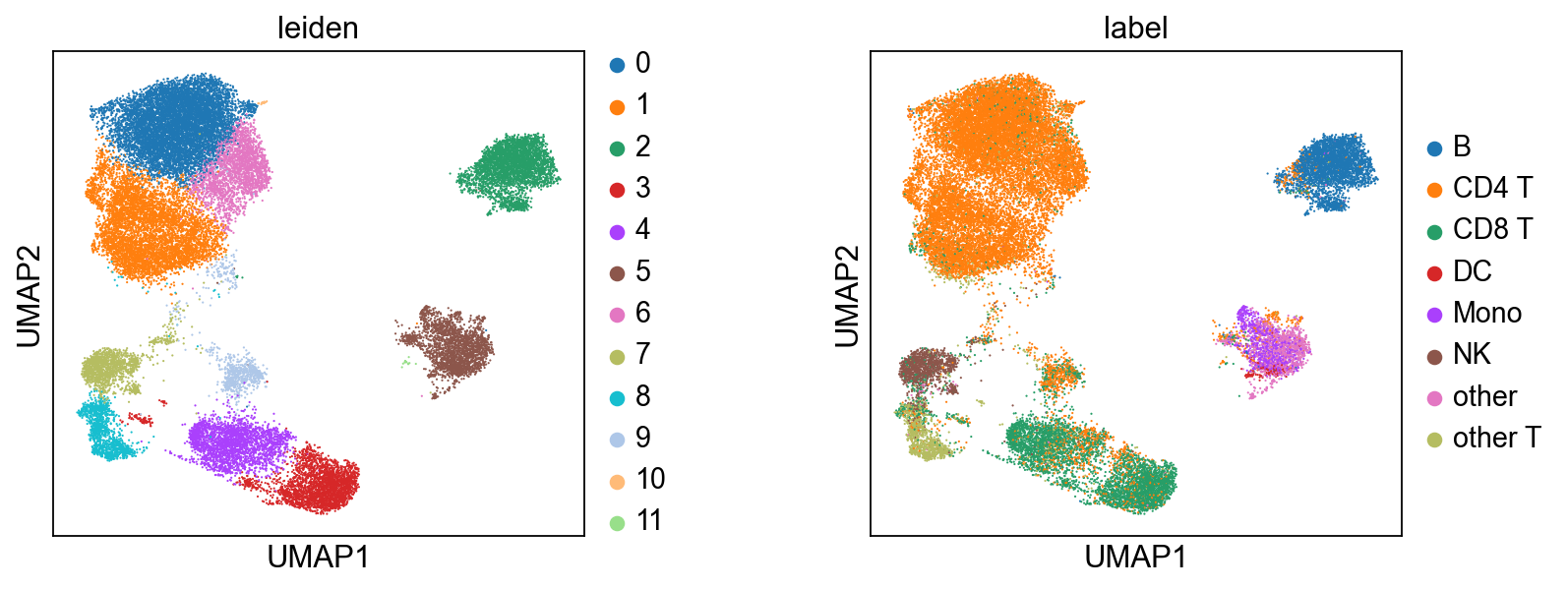
Once mdata.obsm['X_midas'] is populated, MIDAS is out of the picture — the rest is generic single-cell analysis. Here we cluster with Leiden on the integrated representation and compare against the published cell-type labels. For automated cell-type calling, CellTypist plugs in directly here.
[13]:
# Run Leiden on the integrated latent. We wrap mdata.obsm['X_midas'] as an
# AnnData for the cluster step (Leiden takes AnnData), then carry the labels
# back to the MuData for plotting via scmidas.pl.umap.
import anndata as ad
ad_view = ad.AnnData(X=mdata.obsm['X_midas'], obs=mdata.obs[['batch', 'label']].copy())
sc.pp.neighbors(ad_view, use_rep='X', n_neighbors=15)
sc.tl.leiden(ad_view, resolution=0.5)
mdata.obs['leiden'] = ad_view.obs['leiden'].values

# Side-by-side: Leiden clusters from MIDAS-integrated data vs. ground-truth labels.
scmidas.pl.umap(mdata, basis='X_midas', color=['leiden', 'label'], wspace=0.4)
[13]:
AnnData object with n_obs × n_vars = 31350 × 32
    obs: 'label', 'leiden'
    uns: 'leiden_colors', 'label_colors'
    obsm: 'X_umap'